Stop, Look, and Listen: What to Do When Your Business Faces Ransomware

Three Steps to React After a Ransomware Attack
By failing to prepare, you are preparing to fail. — Benjamin Franklin
Ransomware(Ransomware)Since its emergence in 1989, ransomware has consistently appeared on the global list of cyberattack methods. While it was not widely known at the time, the landscape shifted in December 2013 when the CryptoLocker attack became the first to demand payment in cryptocurrency. According to ZDNet, the total ransom paid that month reached $27 million, marking the beginning of a new, highly active era for ransomware. Later, in 2017, the even more potent "WannaCry" emerged. By exploiting the Windows MS17–010 vulnerability (also known as EternalBlue), WannaCry swept through over 150 countries, infecting more than 300,000 computers and causing massive global losses. Since then, ransomware has become an unstoppable force and a constant threat that every business fears.
This article aims to promote stronger corporate cybersecurity. It serves as a guide for businesses that have already been hit by ransomware, while also providing valuable knowledge and defensive strategies for those that have not.
Stop, Look, and Listen: Dealing with Ransomware
When facing a ransomware attack, how can a business effectively stop the damage from spreading and minimize losses in the immediate aftermath? In the following article, we will discuss in detail what businesses should do when hit by ransomware.Stop(Immediate Response),Look(Analyze),Listen(Seek Professional Assistance) response steps.
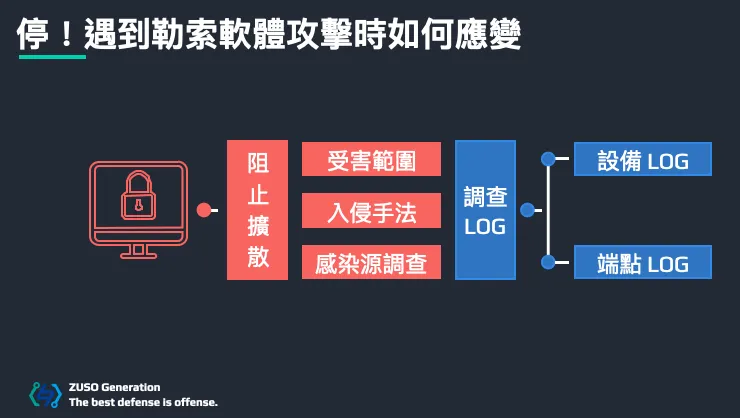
Stop! How to respond to a ransomware attack
When a company discovers that its assets have been encrypted by ransomware, it must first prevent the internal damage from spreading and cut off the source. If the ransomware is allowed to continue spreading within the company, other connected shared service files may be encrypted one after another without notice. To quickly mitigate the infection and effectively reduce damage, companies should prioritize the following steps:
- 1. Isolate infected systems
After ransomware infiltrates a company, its primary steps usually involve scanning the target domain architecture, encrypting files stored in shared folders such as network neighborhood, and attempting to move laterally to infect other systems. To prevent the infection from spreading, the company's first action should be to quickly isolate the infected systems and disconnect from the network.
2. Disable routine work schedules
Companies should immediately disable automated maintenance schedules, such as deleting temporary files(temporary file) or on the affected system performing log rotation(log rotate), as these scheduled tasks can interfere with system files and disrupt the investigation team's analysis process. Some ransomware stores critical information, such as encryption keys, in temporary files, making these logs invaluable records for investigation teams analyzing how ransomware has infected an enterprise system.
3. Create a backup of the infected system
After infecting an enterprise environment, some ransomware will attempt to prevent file recovery efforts. To stop attackers from further compromising, infecting, or deleting backup hosts, enterprises should immediately isolate the system from the network upon infection and create a backup or image file. If the environment consists of virtual machines (VMs), it is recommended to first take a system snapshot to ensure data is preserved.
There are two main reasons for backing up an infected system:
● ○ Prevent data loss
Some ransomware may cause data corruption if decryption fails. For example, the Ryuk ransomware family truncates characters from each file during the decryption process. While this may not significantly impact certain file formats, it poses a risk of corruption for files that store critical information in the final bytes, such as VHD/VHDX virtual machine files and certain Oracle and MySQL database files.
That said, backing up the infected system still ensures data integrity, as it allows for a fresh copy to be made if decryption fails, or provides a basis for seeking expert assistance.
● ○ Potential for future free decryption tools
If the encrypted files are not critical to the business and do not require urgent recovery, they can be backed up and stored while waiting for experts to develop decryption methods in the future.
There have been instances where law enforcement agencies arrested ransomware developers and seized C&C servers, subsequently releasing decryption keys for victims to perform free data recovery. Additionally, many ransomware groups, such as Shade, TeslaCrypt, and CrySis, have released decryption keys after ceasing their operations.
- Do not delete, format, or rebuild the backup or image files of the affected system unless instructed by an expert.
4. Isolate the malware
To facilitate the investigation team's analysis of the infection, enterprises should first attempt to isolate the malware. Deleting the infected environment directly makes it difficult for the team to uncover the root cause. If the malware is still active, a memory dump should be performed before isolation to create a complete record of the running malicious process. The contents of a memory dump may contain the keys used for file encryption; if successfully extracted, this can effectively assist victims in recovering files without paying a ransom.
Look! Identifying ransomware types and investigating the source of infection
Investigating the source of an infection is crucial for understanding the attacker's methods and the scope of a breach. However, pinpointing the exact entry point is rarely easy, as hackers often lurk within corporate systems for long periods before launching an attack, causing potential evidence to be overwritten or deleted over time. By proactively identifying the infection source and ransomware type, organizations can effectively prevent further spread. To determine the attack vector and scope, organizations can follow these steps to narrow down their investigation:
1. Identify the ransomware type
Victims can use free online services, such as Emsisoft's online ransomware identification tool,ID Ransomware , or No More Ransom to identify the specific strain of ransomware. By uploading the ransom note, encrypted files, and the attacker's contact information, these tools analyze the data to confirm the ransomware type. If a free decryption tool is available for that specific strain, the service will provide a link for the user.
2. Investigate the source of infection
The primary goal of investigating the source of infection is to determine the root cause and prevent the incident from spreading further. To do this, the investigation team must analyze a large volume of system logs to trace the attack and collect evidence. Logs can be sourced from network and security devices (routers, switches, IDS, firewalls, proxies, NGFW, WAF) or endpoint records (servers, user devices), which are further categorized into system logs, application logs, and database logs. Below are the key log paths for two common operating systems:
● Windows
○ Application logs in Event Viewer
○ Security logs in Event Viewer
○ System logs in Event Viewer
○ .evtx files located at C:\Windows\System32\winevt\Logs\
● Linux
○ /var/log/message: General and system-related messages
○ /var/log/auth.log: Authentication logs
○ /var/log/kern.log: Kernel logs
○ /var/log/boot.log: System boot logs
○ /var/log/utmp or /var/log/wtmp: Login records
If the compromised host is running services such as IIS or Apache, please back up the log files from the following paths and submit them to a professional team for analysis:
● Windows
○ C:\inetpub\logs\LogFiles (IIS)
○ C:\Windows\System32\LogFiles (IIS)
● Linux
○ /var/log/httpd/ (Apache)
○ /var/log/apache/ (Apache)
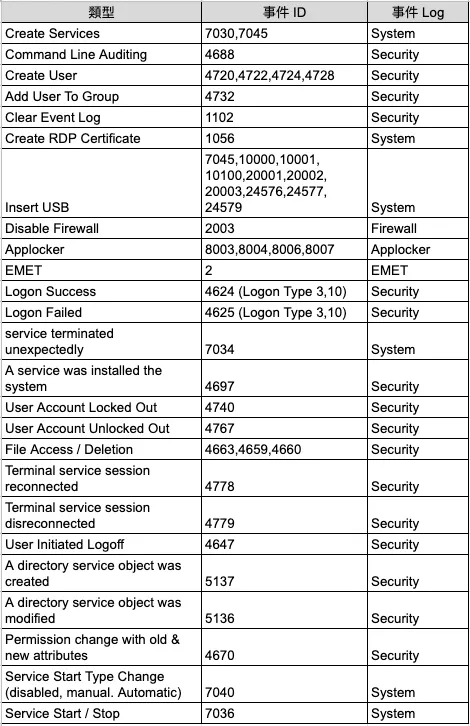
After collecting the logs, the investigation team will begin by analyzing log activity from before the incident to reconstruct the attacker's dwell time and activities. However, in some cases, attackers may attempt to delete logs before an investigation begins to cover their tracks. Therefore, logs from various endpoints should be aggregated into a server or SIEM system for centralized management. This ensures that even if an attacker deletes logs on the compromised host, the investigation team can still conduct their analysis using the centralized data.
According to research by MII Cyber Security Consulting Services, suspicious activity can be identified by analyzing Event IDs and Event Log information. The table below lists common and critical logs compiled by the organization:
Listen! Seek expert advice or assistance from an external professional team
When a business falls victim to a ransomware attack, an improper incident response process can complicate recovery efforts, destroy evidence, and lead to unnecessary ransom payments. Therefore, in the event of an attack, businesses should adhere to the following guidelines:
- DO NOT Restart affected devices
Upon discovering an attack, businesses should avoid restarting devices. Many ransomware strains detect restart attempts and may retaliate by corrupting Windows system components to prevent booting, or by randomly deleting encrypted files. For example, the notorious Jigsaw ransomware deletes 1,000 encrypted files every time a user attempts to restart an infected device.
Furthermore, restarting a device clears temporary files, which may contain critical clues for the investigation team. Instead, put the infected system into hibernation; this saves the contents of temporary memory to the hard drive, where they can be analyzed by experts later.
DO NOT Connect external storage devices (USB drives, external hard drives, etc.) to infected systems
Many ransomware variants actively scan for and target storage devices and backup systems. Until the system is confirmed to be secure, do not connect any external storage devices via physical or network connections to the infected machine.
Active ransomware is often difficult to detect. Many businesses fail to identify residual malware during the recovery process, leading to the secondary encryption of their backup systems or storage devices.
DO NOT Communicate over the infected network
To ensure the security of the recovery process, assume that hackers still have access to the infected network and can intercept internal communications. During recovery, establish a secure, isolated network and prohibit recovery devices from communicating over the infected network until incident response measures are complete and the network is verified as secure.
DO NOT Delete files
Do not delete files from an encrypted system unless specifically advised by experts. Retaining encrypted files is not only helpful for the investigation team, but for ransomware that stores decryption keys within the encrypted files themselves, deletion makes recovery impossible.
Similarly, do not delete ransom notes. Some ransomware, such as DoppelPaymer and BitPaymer, generates a unique ransom message for every encrypted file, containing the encoding and keys required for decryption. If these notes are deleted, the corresponding files cannot be decrypted.
DO NOT Trust the ransomware attackers
Although some attackers claim to have a professional code of ethics or operate on principles of integrity, they are criminals, plain and simple. They are under no obligation to adhere to any agreements or ethical standards. Therefore, businesses should not place full trust in any information provided by ransomware groups, nor should they assume that paying a ransom will guarantee the complete recovery of encrypted data.
No Pay the ransom immediately
While paying a ransom might help a business mitigate ongoing losses, prove more cost-effective than prolonged downtime, and prevent the reputational damage associated with service disruptions, it should always be considered a last resort. Ransom payment should only be contemplated after all other possible data recovery methods have been exhausted. Before making any payment, carefully consider the following factors:
● There is a chance that ransomware attackers will take the payment without providing a decryption method.
● The ransomware may have been purchased from other hacker groups, meaning the attackers did not write the decryption tool themselves, which increases the risk that the provided decryption method will fail.
● Paying the ransom fuels the ransomware ecosystem and encourages the growth of this criminal industry.
If your organization lacks an internal team capable of handling ransomware incidents, it is highly recommended to seek assistance from external digital forensics experts or professional incident response teams.
How to reduce the risk of ransomware attacks
Ransomware attack vectors are highly diverse. They may exploit newly discovered security vulnerabilities, take advantage of human-made configuration errors, or target external-facing services. To effectively reduce the risk of an attack, it is essential to implement comprehensive preventative measures and ensure that systems and services are updated regularly.
Press enter or click to view image in full size
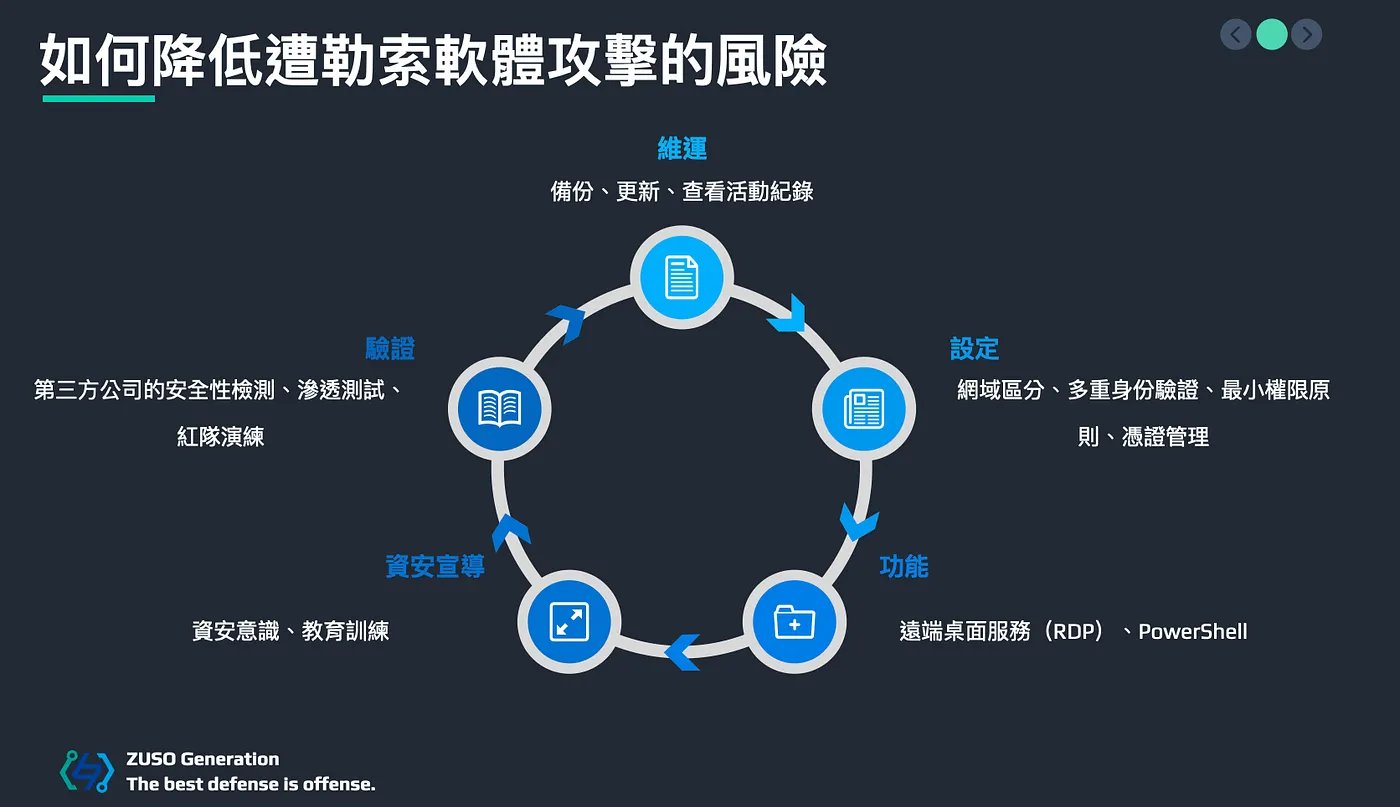
When dealing with well-known and common ransomware (such as Revil),Samas,Bitpaymer and Ryuk). Because these attacks share similar patterns and often exploit the same security vulnerabilities, most can be detected and prevented through regular updates. However, defending against unknown or potential ransomware attacks requires strengthening the overall security of the corporate environment. Organizations should proactively review internal system configurations and access controls. Depending on their size, companies should regularly review and implement the following preventive measures:
- 1. Regular Backups: We recommend performing data backups on a regular basis, with strict access control over backup devices.
- 2.Regular Updates: Ensure that all services, infrastructure, and applications are running the latest security updates.
- 3. Monitor Activity Logs: Administrators should regularly review Active Directory (AD) activity logs for any unauthorized new users or suspicious files that may indicate a backdoor.
- 4. Network Segmentation: Implement proper network segmentation between departments to minimize the risk of lateral movement if an infection occurs.
- 5. Multi-Factor Authentication: Enable multi-factor authentication for account logins to reduce the risk of compromised credentials.
- 6. Principle of Least Privilege: Assign the minimum necessary permissions to each account and avoid using domain-wide administrative accounts.
- 7. Credential Management: Robust credential management helps prevent brute-force attacks and reduces the risk of credential theft and unauthorized access.
- 8. Control Remote Access: Remote Desktop Protocol (RDP) is a common attack vector. Enterprises must strictly manage remote access permissions and accounts—for example, by requiring VPN access or restricting specific accounts to specific devices.
- 9. PowerShell: PowerShell is a common tool used by ransomware for lateral movement within a target network. Administrators should strictly restrict which devices can use this tool.
- 10. Employee Training: Most security breaches occur through phishing websites/emails or weak passwords. Improving employee security awareness can significantly reduce these risks.
- 11. Engage Third-Party Security Assessments: In addition to regular backups and software updates for devices and endpoints, companies should periodically hire professional firms to conduct penetration testing,and red team exercises or Network Health Check Architecture, to ensure the overall security of the corporate environment.
References
- Wikipedia — Ransomware, https://zh.wikipedia.org/wiki/%E5%8B%92%E7%B4%A2%E8%BB%9F%E9%AB%94
- Practical Guide to Cybersecurity Incident Response, https://www.qianxin.com/book/detail?book=31
- Human-Operated Ransomware Attacks: A Preventable Disaster, https://news.microsoft.com/zh-tw/features/threat-protection/
- 8 Critical steps to take after a ransomware attack: Ransomware response guide for businesses, https://blog.emsisoft.com/en/36921/8-critical-steps-to-take-after-a-ransomware-attack-ransomware-response-guide-for-businesses/
- Log Analysis for Digital Forensic Investigation, https://medium.com/mii-cybersec/log-analysis-for-digital-forensic-investigation-e4a00f5a5c09
- CryptoLocker’s crimewave: A trail of millions in laundered Bitcoin, https://www.zdnet.com/article/cryptolockers-crimewave-a-trail-of-millions-in-laundered-bitcoin/
- CISA MS-ISAC Ransomware Guide
https://www.cisa.gov/sites/default/files/publications/CISA_MS-ISAC_Ransomware%20Guide_S508C.pdf
We provide penetration testing, red teaming, and cybersecurity consulting services to help organizations conduct comprehensive system health checks and reduce security risks. In the event of an attack, we also offer incident response services to analyze vulnerabilities, provide mitigation strategies, and implement immediate fixes to minimize the impact. If you need assistance, please feel free to contact us .